
Where do you rank on Google Maps?
See your ranking map: give us your business name and the keyword a customer would search for, and we email you a colour-coded map of where you rank from points around your business. The first scan is free.
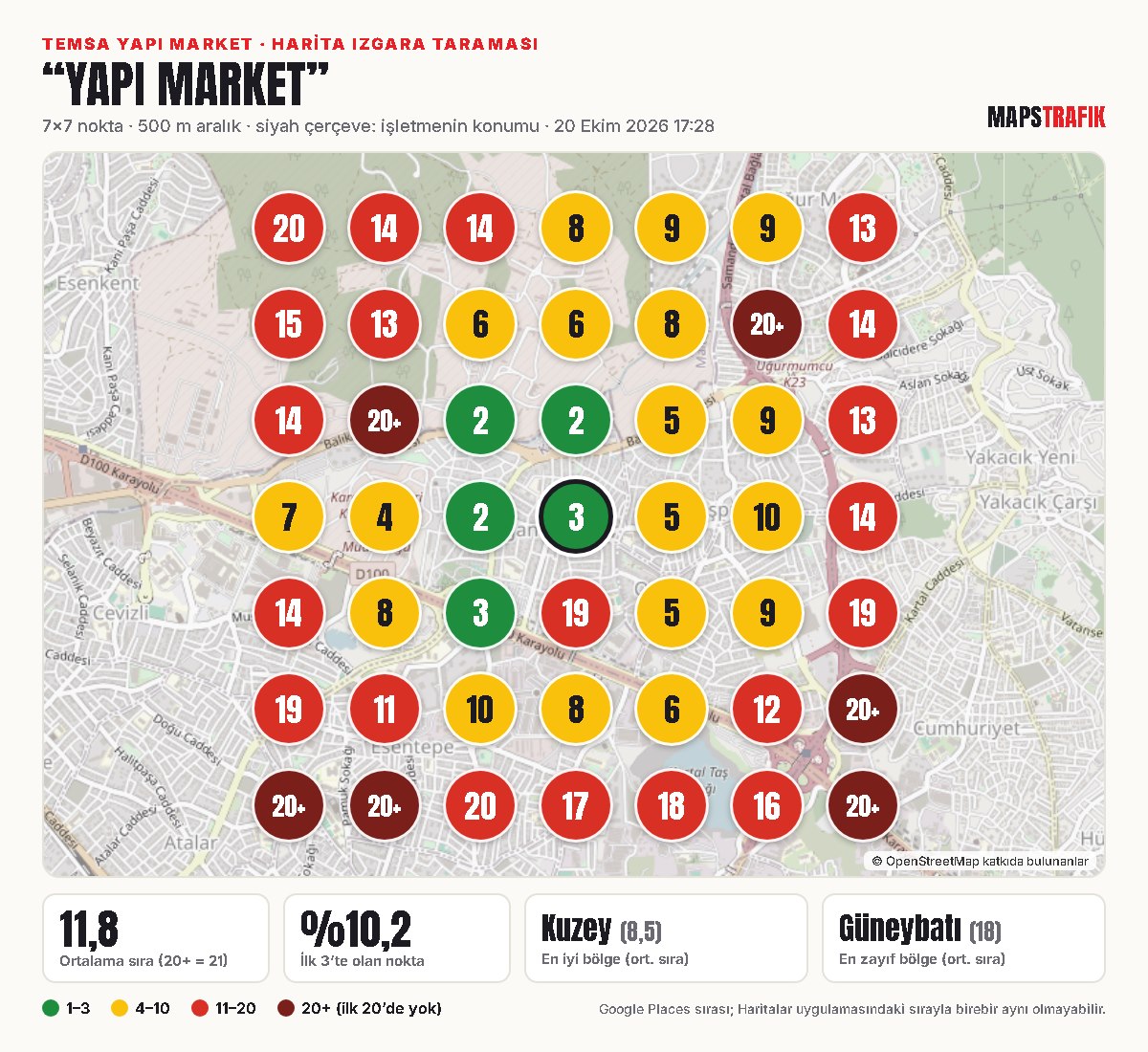
What does this example show?
- The business is in the top three at 5 of 49 points, all right around the business.
- The average rank is 5.1 in the central area and 11.8 over all points (a point outside the top 20 counts as 21).
- Of the outer areas, the north is best (8.5) and the south-west is weakest (18).
This map was made with the method of the free ranking map. It is separate from our regular map measurement and from the measurements on the Temsa case page, and it uses a different number of points.
The rank is the one Google's public place search returns; it may not be exactly the same as the rank in the Google Maps app.
Request your map
How to read the map
Each circle is a point
A circle shows where someone searching from that point around your business sees you. The number inside the circle is your rank.
Colour tells the rank
Green: 1–3. Yellow: 4–10. Red: 11–20. Dark red "20+": you are not in the first 20 results.
Look around, not just at the centre
You can be strong in front of the shop and weak two streets away. The average rank and the number of top-three points under the map help you see which direction is weak.
Frequently asked questions
Is it really free, and when do I get the map?
The first scan is free once you confirm in the form that you own the business or may act for it. One request covers one business and one keyword. The map is emailed on business days between 08:00 and 19:00 (Istanbul time); requests are answered the same day, Monday–Saturday 09:00–19:00.
Is the rank on the map the same as what I see in the Google Maps app?
Not necessarily. The map shows the rank that Google's public place search returns from each point. The rank you see in the app changes with your location, your past searches and the words you use. To compare, we scan again with the same method.
Do you promise a top position on the map?
No, we do not, and nobody can. Google decides the ranking. The map measures where you stand; it shows where you are strong and where you are weak, and we talk through the next step together.
Want to measure the map regularly?
One map is a starting point. When we scan the same keyword again with the same method, the change reads side by side. See how regular measurement works and what the plans include.